要約
- Next.jsにFullcalendarを導入する際、React公式ドキュメント通りに構築すると、node_modules内からのCSSインポートが禁止されているため、「Global CSS cannot be imported from within node_modules」というエラーが発生する。
- 本記事では、next-transpile-modulesとbabel-plugin-transform-require-ignoreを使用した解決手順を、プロジェクト作成からビルドまで段階的に解説する。
対象読者: Next.js初心者〜中級者、Fullcalendarを導入しようとしている開発者
検証環境: Next.js、@fullcalendar/react、@fullcalendar/daygrid(2025年1月時点)
この記事を読むことで得られるメリット
この記事を読むことで以下のことが分かる:
- Next.jsでFullcalendarを導入する際のCSS importエラーの原因
- next-transpile-modulesを使ったESMトランスパイル方法
- babel-plugin-transform-require-ignoreによるCSSインポート削除の実装
- プロジェクト作成から動作確認までの完全な実装手順
この記事を読むのにかかる時間
約8分
環境
- MacOS Apple M4 Max Sequoia 15.1
問題の概要
React用の公式ドキュメント通りにFullcalendarを構築しようとすると、以下のエラーが生じる。
Global CSS cannot be imported from within node_modules.
エラーの原因
Next.jsでは、node_modules内のファイルからCSSをimportすることは禁止されている。しかし、Fullcalendarのコードでは以下のようにCSSがインポートされているため、エラーが発生する。
node_modules/@fullcalendar/common/main.js:
import './main.css';
import { __assign, __spreadArrays, __extends } from 'tslib';
import { createContext, Component, createRef, createElement, Fragment } from './vdom.js';
export * from './vdom.js';
参考: https://github.com/vercel/next.js/blob/master/errors/css-npm.md
解決手順
上記の問題を解決するため、以下の手順で実装を進める。
プロジェクトの作成
まず、Next.jsプロジェクトを作成する。
npx create-next-app --text-app
Fullcalendarライブラリのインストール
Fullcalendarの必要なパッケージをインストールする。
npm install @fullcalendar/react @fullcalendar/daygrid
カレンダーコンポーネントの作成
Calendar.jsxを作成し、基本的なカレンダーコンポーネントを実装する。
import FullCalendar from "@fullcalendar/react";
import dayGridPlugin from "@fullcalendar/daygrid";
const Calendar = () => (
<FullCalendar
plugins={[dayGridPlugin]}
initialEvents={[{ title: "initial event", start: new Date() }]}
/>
);
export default Calendar;
ESMトランスパイル設定
ESMで書かれているFullCalendarをトランスパイルできるようにするため、next-transpile-modulesをインストールする。
npm install next-transpile-modules@^4.1.0
次に、next.config.jsを作成し、以下の内容を記述する。
const withTM = require("next-transpile-modules")(["@fullcalendar"]);
module.exports = withTM({});
Babel設定によるCSSインポート削除
babel-plugin-transform-require-ignoreをインストールする。
npm install babel-plugin-transform-require-ignore
参考: https://www.npmjs.com/package/babel-plugin-transform-require-ignore
babel.config.jsを作成し、以下の内容を記述する。この設定により、node_modules内のファイルから.cssをインポートしている部分を削除できる。
module.exports = {
presets: ["next/babel"],
overrides: [
{
include: ["./node_modules"],
plugins: [
[
"babel-plugin-transform-require-ignore",
{
extensions: [".css"],
},
],
],
},
],
};
CSSの読み込み
Calendar.jsxにCSSを直接読み込ませるよう修正する。
import FullCalendar from "@fullcalendar/react";
import dayGridPlugin from "@fullcalendar/daygrid";
import '@fullcalendar/common/main.css'
import '@fullcalendar/daygrid/main.css'
const Calendar = () => (
<FullCalendar
plugins={[dayGridPlugin]}
initialEvents={[{ title: "initial event", start: new Date() }]}
/>
);
export default Calendar;
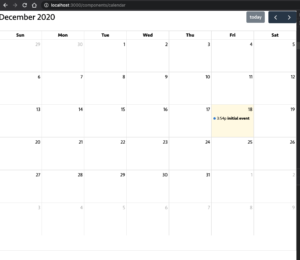
ビルドと動作確認
開発サーバーを起動し、動作を確認する。
npm run dev
これで、Fullcalendarが正常に表示されるはずである。
まとめ
本記事では、Next.jsにFullcalendarを導入する際のCSS importエラーの原因と対処法を解説した。next-transpile-modulesでESMをトランスパイルし、babel-plugin-transform-require-ignoreでnode_modules内のCSSインポートを削除することで、エラーを回避できる。最後にコンポーネント側でCSSを直接インポートすることで、Fullcalendarを正常に動作させることが可能である。